---
title: How To Activate Payment Processing for Financials
description: Ready to start collecting donations and sending invoices through Pawlytics? Get started now!
---
[Skip to content](https://learn.pawlytics.com/en/knowledge/setting-up-payments#main-content)
English
Show submenu for translations
![Pawlytics\_Paw-1.png\]](https://learn.pawlytics.com/hs-fs/hubfs/Pawlytics_Paw-1.png?height=40&name=Pawlytics_Paw-1.png)
Open main navigation
Close main navigation
- English
Show submenu for translations
- [Go to app.pawlytics.com](https://app.pawlytics.com/)
[Go to app.pawlytics.com](https://app.pawlytics.com/)
Welcome! HOWL can we help you?
- There are no suggestions because the search field is empty.
1. [Pawlytics Help Center](https://learn.pawlytics.com/en/knowledge?hsLang=en)
2. [Financials](https://learn.pawlytics.com/en/knowledge/financials?hsLang=en)
# How To Activate Payment Processing for Financials
## Ready to start collecting donations and sending invoices through Pawlytics? Get started now!
⛔ You **MUST** be a founder, executive director, or president to get this set up. Your information **MUST** be listed in the articles of incorporation.
Please also note: Payment processing is only available for US or Canada-based organizations (for now 😉)
#### **📋 Things to know/have on hand before you get started:**
- Articles of Incorporation
- Tax Exemption Documents
- Bank Account and Routing # OR the log in to your banking institution (preferred) - payments will be deposited straight to this bank account
- Government Issued Photo ID (ex. driver's license, passport)
- Smartphone (recommended but not required if your computer has a camera attached - you will need this to verify your identity)
- You will also need to know your date of incorporation and EIN
### **Getting Started**
Navigate to the new financials tab in your Pawlytics account and you'll see a red banner prompting you to complete a form to get started:
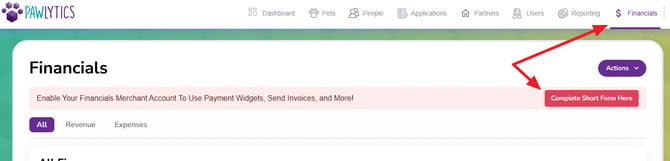
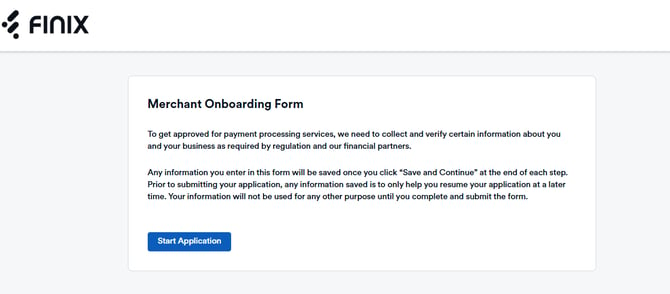
This will open a new tab to start your onboarding form through Finix - the new payment processor Pawlytics has partnered with to make this possible and keep things secure!
### Step 1: Business Info
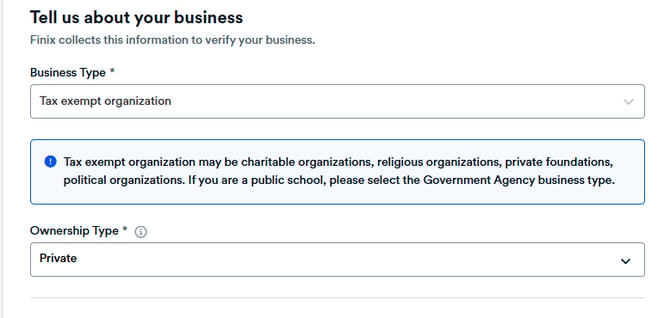
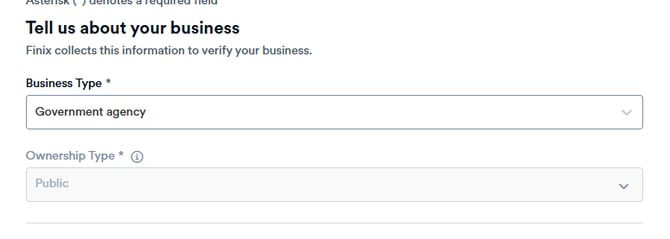
Click to start your application and depending on your organization, your business type will either be a Tax exempt organization (private animal rescue/shelter) or a Government agency (public municipal shelter):
or
**Business description:** Don't overthink this, if you're a foster based pet rescue, you can simply put "foster based pet rescue"
\*\*If you entered Tax exempt organization, you will also be asked to upload your 501c3 Tax Exemption Documents
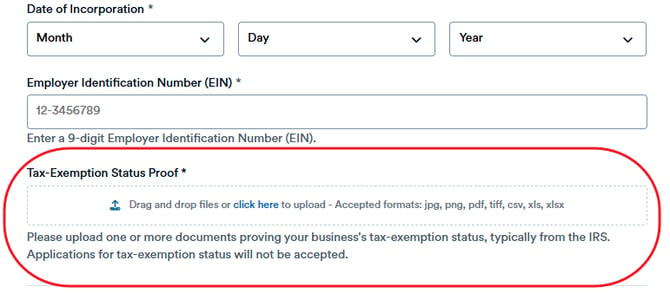
**Business address:** This cannot be a PO Box. If you are a foster based rescue with no physical address, please use your own, personal home address as the person authorized to complete this form.

### Step 2: Owner Info
You will be asked for personal details like your date of birth and social security number. This is due to security compliance with the US Patriot Act:
- The US PATRIOT Act **requires** financial institutions, including payment processors, to implement Anti-Money Laundering (AML) programs to prevent terrorism financing and money laundering. This involves verifying customer identities per Know Your Customer (KYC) regulations by collecting and recording identifying information.
**Ownership Percentage:** you can put 0% (this looks like it's already entered, but you do have to click into the box and type it in)
### Step 3: Processing Info
**Merchant Category Code (MCC):** 8398 Charitable and Social Service Organizations
**Default Statement Descriptor:** This is how you'd like your name to appear in the bank statements of those who pay or donate to your organization
**Card Volume:** Estimate how many donations you receive in a year and what the most likely amount would be that someone would donate at one time
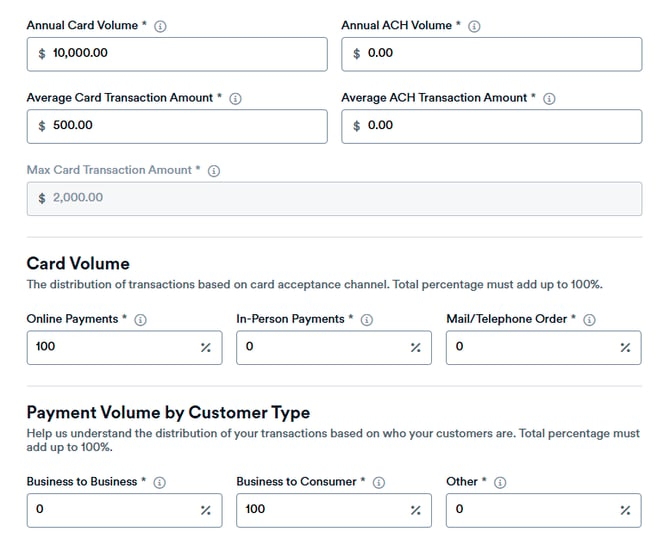
- Note that all percentages must equal to 100% so if you are putting 100 in any box, you must also put zeros in the remaining boxes
### Step 4: Bank Account Info
If you have the login and password information, the easiest way to complete this step is to auto-link your bank using the second option on screen:
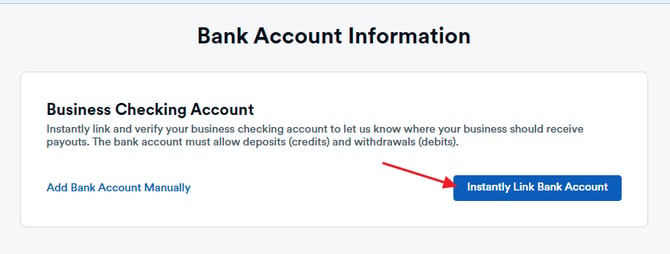
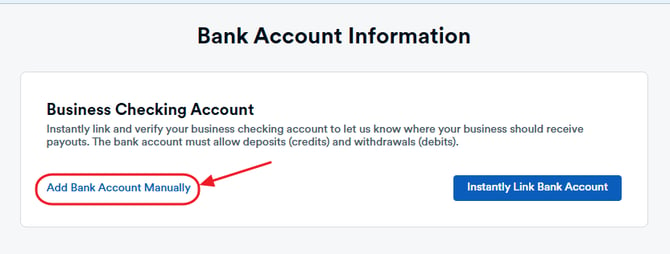
Otherwise, you can also manually connect your bank using the Routing and Account number for where you would like payments to be deposited:
*Please note: This method takes longer because you will be emailed to provide a bank statement as proof of ownership for the account*
### Step 5: Identity Verification
You'll be asked to verify your identity by uploading your valid photo ID and then taking a picture of yourself either by using the camera on your desktop device or (much easier) you can scan the QR code that will appear on screen to proceed with this step on your mobile device!
### Step 6: Review and Submit
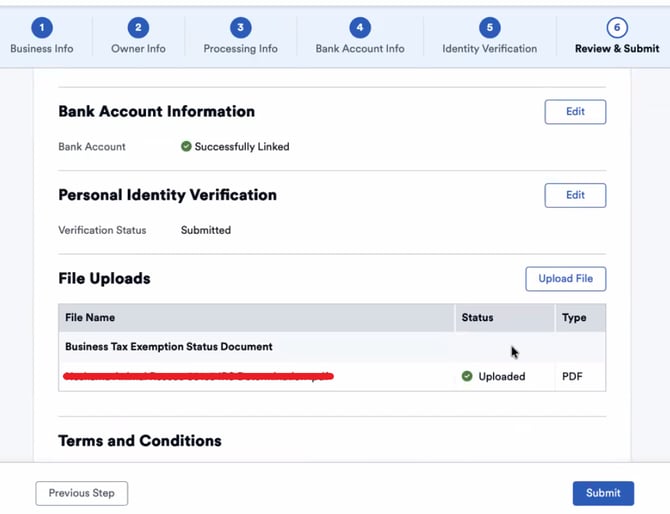
At this point is where you can upload your Articles of Incorporation. There is no place on the actual form to upload this information as you did with your 501c3 Tax Exempt Document but the information **IS** needed to finalize your account. Scroll to the file upload on this page and attach your Articles before submitting:
And that's everything! Now you just need to wait for your approval 🥳.
Meanwhile, you can start building the individual financial pieces inside Pawlytics to prepare for when you're live!! Click the links below to learn more:
- [Financial Settings](https://learn.pawlytics.com/en/knowledge/financial-settings?hsLang=en)
- [Invoice templates](https://learn.pawlytics.com/en/knowledge/how-to-set-up-invoice-templates?hsLang=en)
- [FAQ](https://learn.pawlytics.com/en/knowledge/faq-about-payments/financials?hsLang=en)
- [Pets](https://learn.pawlytics.com/en/knowledge/pets?hsLang=en#main-content)
- [Medical Care](https://learn.pawlytics.com/en/knowledge/pets?hsLang=en#medical-care)
- [Getting Started](https://learn.pawlytics.com/en/knowledge/getting-started?hsLang=en)
- [People](https://learn.pawlytics.com/en/knowledge/people?hsLang=en)
- [Users](https://learn.pawlytics.com/en/knowledge/users?hsLang=en)
- [About Pawlytics](https://learn.pawlytics.com/en/knowledge/about-pawlytics?hsLang=en)
- [Applications](https://learn.pawlytics.com/en/knowledge/applications?hsLang=en)
- [Organization Settings](https://learn.pawlytics.com/en/knowledge/organization-settings?hsLang=en)
- [E-Contracts](https://learn.pawlytics.com/en/knowledge/e-contracts?hsLang=en)
- [Financials](https://learn.pawlytics.com/en/knowledge/financials?hsLang=en)
- [Your Partners](https://learn.pawlytics.com/en/knowledge/your-partners?hsLang=en)
- [Pawlytics Partners](https://learn.pawlytics.com/en/knowledge/pawlytics-partners?hsLang=en)
- [Automatic Microchip Registrations](https://learn.pawlytics.com/en/knowledge/automatic-microchip-registrations?hsLang=en#main-content)
- [AKC Reunite](https://learn.pawlytics.com/en/knowledge/automatic-microchip-registrations?hsLang=en#akc-reunite)
- [HomeAgain](https://learn.pawlytics.com/en/knowledge/automatic-microchip-registrations?hsLang=en#homeagain)
- [PetLink](https://learn.pawlytics.com/en/knowledge/automatic-microchip-registrations?hsLang=en#petlink)
- [SmartTag](https://learn.pawlytics.com/en/knowledge/automatic-microchip-registrations?hsLang=en#smarttag)
- [Reporting](https://learn.pawlytics.com/en/knowledge/reporting?hsLang=en)
- [FUR-cus Groups](https://learn.pawlytics.com/en/knowledge/fur-cus-groups?hsLang=en)
[](http://pawlytics.com)
pawlytics.com Help Center
Copyright © 2026, Pawlytics
```json
{
"@context" : "https://schema.org",
"@type" : "VideoObject",
"contentUrl" : "https://8669442.fs1.hubspotusercontent-na2.net/hubfs/8669442/payment%20setup.mp4",
"dateModified" : "2026-08-26T22:38:02.123Z",
"duration" : "PT4M19S",
"height" : 720,
"name" : "payment setup",
"thumbnailUrl" : "https://8669442.fs1.hubspotusercontent-na2.net/hubfs/8669442/payment%20setup.mp4/medium.jpg",
"uploadDate" : "2026-08-26T22:38:02.121Z",
"width" : 990
}
```