---
title: How to Update Your Billing Information
description: Whether you have a new admin and need to update your credit card, or need to change your email address to one you check more often, this knowledge base will take you through updating your billing information.
---
[Skip to content](https://learn.pawlytics.com/en/knowledge/how-to-update-your-billing-information#main-content)
English
Show submenu for translations
![Pawlytics\_Paw-1.png\]](https://learn.pawlytics.com/hs-fs/hubfs/Pawlytics_Paw-1.png?height=40&name=Pawlytics_Paw-1.png)
Open main navigation
Close main navigation
- English
Show submenu for translations
- [Go to app.pawlytics.com](https://app.pawlytics.com/)
[Go to app.pawlytics.com](https://app.pawlytics.com/)
Welcome! HOWL can we help you?
- There are no suggestions because the search field is empty.
1. [Pawlytics Help Center](https://learn.pawlytics.com/en/knowledge?hsLang=en)
2. [Organization Settings](https://learn.pawlytics.com/en/knowledge/organization-settings?hsLang=en)
# How to Update Your Billing Information
## Whether you have a new admin and need to update your credit card, or need to change your email address to one you check more often, this knowledge base will take you through updating your billing information.
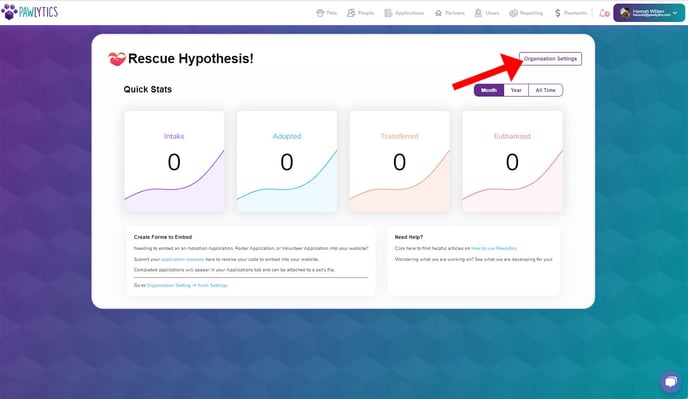
When you first log into Pawlytics, you'll need to click on your 'Organization Settings' located in the top right above the Month | Year | All Time filter buttons.
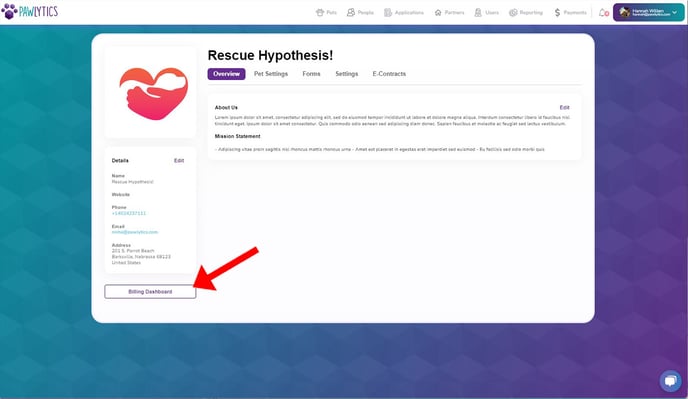
Your 'Billing Dashboard' is located in the bottom left underneath your rescue's details. Click the billing dashboard button to be able to edit your billing settings.
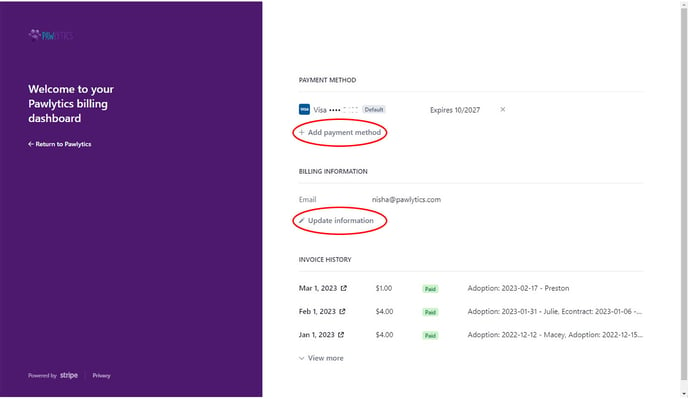
Once in your Billing Dashboard you will be able to see the last four digits and the expiration date of the card on file for your rescue in the PAYMENT METHOD section. This is where you can delete the card by selecting the 'x', and add a new card by clicking '+ Add payment method.'
Below that is the BILLING INFORMATION section where you can update your rescue's billing email address by clicking 'Update information.'
- [Pets](https://learn.pawlytics.com/en/knowledge/pets?hsLang=en#main-content)
- [Medical Care](https://learn.pawlytics.com/en/knowledge/pets?hsLang=en#medical-care)
- [Getting Started](https://learn.pawlytics.com/en/knowledge/getting-started?hsLang=en)
- [People](https://learn.pawlytics.com/en/knowledge/people?hsLang=en)
- [Users](https://learn.pawlytics.com/en/knowledge/users?hsLang=en)
- [About Pawlytics](https://learn.pawlytics.com/en/knowledge/about-pawlytics?hsLang=en)
- [Applications](https://learn.pawlytics.com/en/knowledge/applications?hsLang=en)
- [Organization Settings](https://learn.pawlytics.com/en/knowledge/organization-settings?hsLang=en)
- [E-Contracts](https://learn.pawlytics.com/en/knowledge/e-contracts?hsLang=en)
- [Financials](https://learn.pawlytics.com/en/knowledge/financials?hsLang=en)
- [Your Partners](https://learn.pawlytics.com/en/knowledge/your-partners?hsLang=en)
- [Pawlytics Partners](https://learn.pawlytics.com/en/knowledge/pawlytics-partners?hsLang=en)
- [Automatic Microchip Registrations](https://learn.pawlytics.com/en/knowledge/automatic-microchip-registrations?hsLang=en#main-content)
- [AKC Reunite](https://learn.pawlytics.com/en/knowledge/automatic-microchip-registrations?hsLang=en#akc-reunite)
- [HomeAgain](https://learn.pawlytics.com/en/knowledge/automatic-microchip-registrations?hsLang=en#homeagain)
- [PetLink](https://learn.pawlytics.com/en/knowledge/automatic-microchip-registrations?hsLang=en#petlink)
- [SmartTag](https://learn.pawlytics.com/en/knowledge/automatic-microchip-registrations?hsLang=en#smarttag)
- [Reporting](https://learn.pawlytics.com/en/knowledge/reporting?hsLang=en)
- [FUR-cus Groups](https://learn.pawlytics.com/en/knowledge/fur-cus-groups?hsLang=en)
[](http://pawlytics.com)
pawlytics.com Help Center
Copyright © 2026, Pawlytics
```json
{
"@context" : "https://schema.org",
"@type" : "VideoObject",
"contentUrl" : "https://8669442.fs1.hubspotusercontent-na2.net/hubfs/8669442/Update%20Billing%20Information.mkv",
"dateModified" : "2023-03-02T19:05:06.192Z",
"duration" : "PT51S",
"height" : 1080,
"name" : "Update Billing Information",
"thumbnailUrl" : "https://8669442.fs1.hubspotusercontent-na2.net/hubfs/8669442/Update%20Billing%20Information.mkv/medium.jpg",
"uploadDate" : "2023-03-02T19:04:56.286Z",
"width" : 1920
}
```