---
title: How Do I Delete or Refund a Transaction
description: Made a mistake recording an offline payment? Need to refund an adoption fee? Here are the steps
---
[Skip to content](https://learn.pawlytics.com/en/knowledge/how-do-i-delete-or-refund-a-transaction#main-content)
English
Show submenu for translations
![Pawlytics\_Paw-1.png\]](https://learn.pawlytics.com/hs-fs/hubfs/Pawlytics_Paw-1.png?height=40&name=Pawlytics_Paw-1.png)
Open main navigation
Close main navigation
- English
Show submenu for translations
- [Go to app.pawlytics.com](https://app.pawlytics.com/)
[Go to app.pawlytics.com](https://app.pawlytics.com/)
Welcome! HOWL can we help you?
- There are no suggestions because the search field is empty.
1. [Pawlytics Help Center](https://learn.pawlytics.com/en/knowledge?hsLang=en)
2. [Financials](https://learn.pawlytics.com/en/knowledge/financials?hsLang=en)
# How Do I Delete or Refund a Transaction
## Made a mistake recording an offline payment? Need to refund an adoption fee or part of a payment? Here are the steps
### Deleting Transactions
You can only delete transactions that were recorded as **Offline Revenue** or **Offline Expense.** This is because those transactions took place outside of Pawlytics and you are only recording them for financial tracking but no funds were exchanged through Pawlytics.
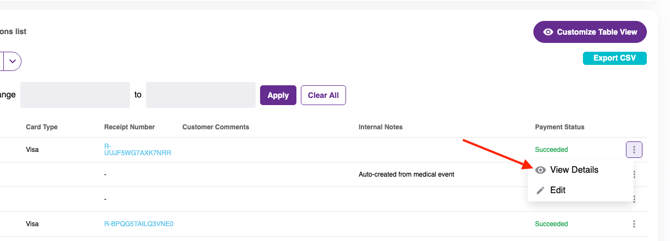
**Card transactions cannot be deleted** but they can be partially or fully refunded. First click the 3 dots at the end of the transaction line and click View Details:
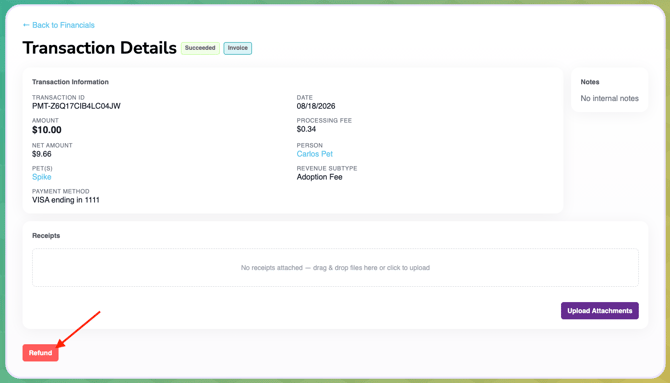
From this page you can upload any relevant attachments and/or issue a refund:
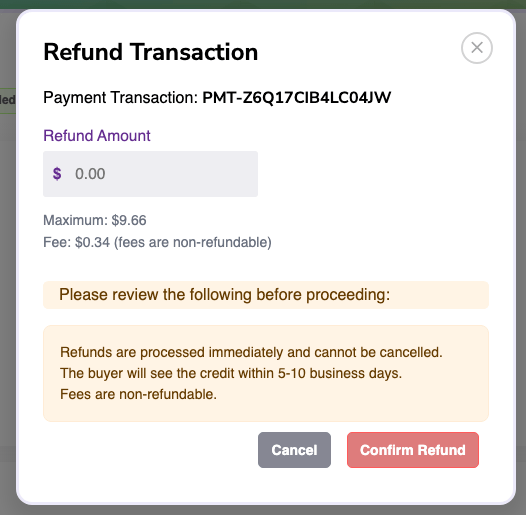
**\*PLEASE NOTE**: The transaction fee cannot be refunded. When you begin to issue a refund, you'll be shown how much of the total payment was the transaction fee and how much is available to refund. **Once you confirm you want to refund the amount you've entered, this CANNOT BE UNDONE.**
- [Pets](https://learn.pawlytics.com/en/knowledge/pets?hsLang=en#main-content)
- [Medical Care](https://learn.pawlytics.com/en/knowledge/pets?hsLang=en#medical-care)
- [Getting Started](https://learn.pawlytics.com/en/knowledge/getting-started?hsLang=en)
- [People](https://learn.pawlytics.com/en/knowledge/people?hsLang=en)
- [Users](https://learn.pawlytics.com/en/knowledge/users?hsLang=en)
- [About Pawlytics](https://learn.pawlytics.com/en/knowledge/about-pawlytics?hsLang=en)
- [Applications](https://learn.pawlytics.com/en/knowledge/applications?hsLang=en)
- [Organization Settings](https://learn.pawlytics.com/en/knowledge/organization-settings?hsLang=en)
- [E-Contracts](https://learn.pawlytics.com/en/knowledge/e-contracts?hsLang=en)
- [Financials](https://learn.pawlytics.com/en/knowledge/financials?hsLang=en)
- [Your Partners](https://learn.pawlytics.com/en/knowledge/your-partners?hsLang=en)
- [Pawlytics Partners](https://learn.pawlytics.com/en/knowledge/pawlytics-partners?hsLang=en)
- [Automatic Microchip Registrations](https://learn.pawlytics.com/en/knowledge/automatic-microchip-registrations?hsLang=en#main-content)
- [AKC Reunite](https://learn.pawlytics.com/en/knowledge/automatic-microchip-registrations?hsLang=en#akc-reunite)
- [HomeAgain](https://learn.pawlytics.com/en/knowledge/automatic-microchip-registrations?hsLang=en#homeagain)
- [PetLink](https://learn.pawlytics.com/en/knowledge/automatic-microchip-registrations?hsLang=en#petlink)
- [SmartTag](https://learn.pawlytics.com/en/knowledge/automatic-microchip-registrations?hsLang=en#smarttag)
- [Reporting](https://learn.pawlytics.com/en/knowledge/reporting?hsLang=en)
- [FUR-cus Groups](https://learn.pawlytics.com/en/knowledge/fur-cus-groups?hsLang=en)
[](http://pawlytics.com)
pawlytics.com Help Center
Copyright © 2026, Pawlytics
```json
{
"@context" : "https://schema.org",
"@type" : "VideoObject",
"contentUrl" : "https://8669442.fs1.hubspotusercontent-na2.net/hubfs/8669442/refund.mp4",
"dateModified" : "2026-08-28T20:51:51.776Z",
"duration" : "PT53S",
"height" : 720,
"name" : "refund",
"thumbnailUrl" : "https://8669442.fs1.hubspotusercontent-na2.net/hubfs/8669442/refund.mp4/medium.jpg",
"uploadDate" : "2026-08-28T20:51:51.774Z",
"width" : 990
}
```